
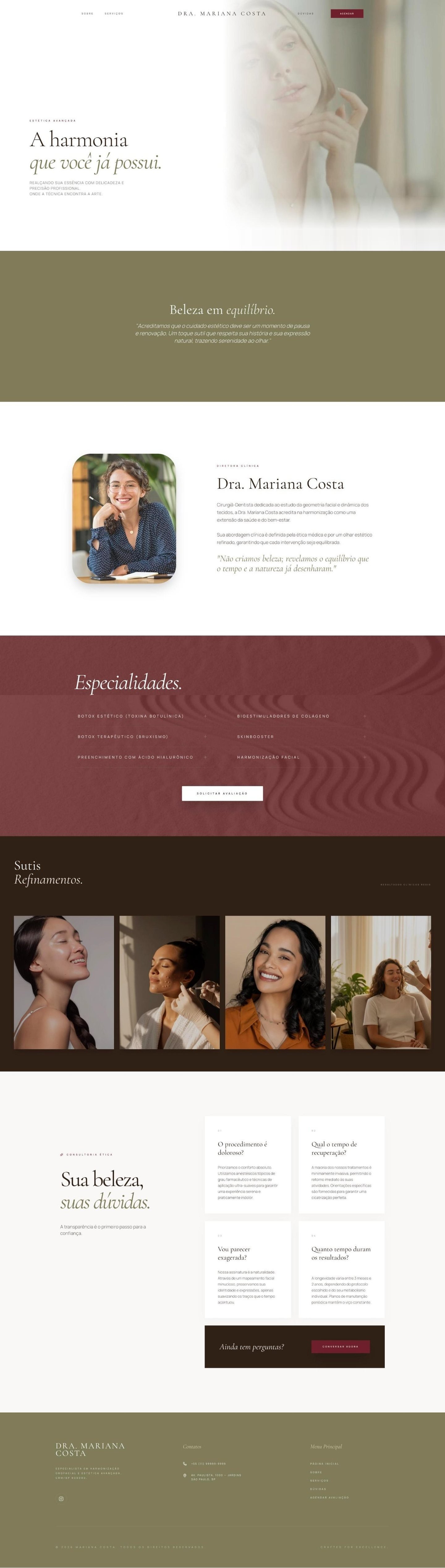
Search for esthetician website examples and you will find long lists of beautiful spa sites. They are great for inspiration, but they rarely explain which details make a visitor stop scrolling and book a facial. That is the part of esthetician web design that matters for a small skincare practice.
Weave, a platform for health and beauty practices, sums up what an esthetician website needs in its own guide: clear service pages with what happens and what it costs, online booking, quality photos, reviews, a calm and clean design, easy navigation on a phone and local search. Weave also notes, citing the US Bureau of Labor Statistics, that more than 80,000 Americans work as estheticians. Standing out among them starts with a site that answers questions before they are asked.
Here is what the esthetician websites that book clients have in common, followed by examples for different kinds of practices.
The short answer: the esthetician website examples that work share six things. A first screen that says who and where, a treatment menu with prices and durations, real photos of your work and space, booking without friction, reviews with a short about section, and a calm design that loads fast on a phone.
1. A first screen that says who and where
The best examples open with one clear sentence: "Facials and acne care for sensitive skin in Austin." Add one button, usually "Book a treatment", and a real photo of you or your space. A visitor should know in five seconds whether you are the right person and how to book.
2. A treatment menu with prices and durations
This is where most esthetician sites lose clients. Weave recommends describing each service, what happens during it and what it costs. For every treatment, write what it is good for, how long it takes and where the price starts. Group treatments by concern (acne, glow, anti aging) instead of by technical name, because clients search by problem, not by method.
3. Real photos of your work and your space
Weave suggests high quality photos, including before and after images, to build confidence. Use only your own work, with the client's OK, and keep the editing honest. Add a few photos of your treatment room, so new clients can picture their first visit.
4. Booking without friction
Online booking lets clients schedule at night, when they finally have time to think about their skin. Link your booking app from every treatment and from a button that follows the visitor down the page. Fewer clicks between "I want this" and "booked" means more appointments.
5. Reviews and a short about section
Reviews show that real people trusted you and were happy. Place two or three near your treatment menu, not hidden at the bottom. Then add a short, warm about section: why you became an esthetician, your training and how you work.
6. Calm design that loads fast on a phone
Most of your visitors will come from Instagram, on a phone. Weave recommends a clean, minimalist design with a restrained color palette and only a few interactive effects. Heavy animations and huge videos make a page slow, and a slow page loses people before they see your treatments.
A good esthetician website answers every question a client would ask in your DMs, before she has to ask it.
Examples by type of practice
A solo esthetician in a studio. One page is often enough: the first screen, a menu of six to eight treatments with prices, before and after photos, three reviews, your story and a map. The booking button appears after every section.
An acne or sensitive skin specialist. Lead with the concern, not the treatments. A section like "How we treat acne" explains your process step by step, then links to the treatments that belong to it. This kind of page also helps you appear on Google for searches about your specialty in your city.
A small skin clinic with several professionals. Here a multi-page site works better: a page for each treatment category, a team page with each professional's photo and specialty, and a page about your location and parking. We wrote more about this in med spa marketing ideas that start with your website.
A mobile or home studio esthetician. Explain clearly where you work, the area you cover and what clients should prepare. Show your setup in photos, so clients feel safe booking with you.
Get found nearby
Weave lists local search as part of a site that books. Use your city or neighborhood in your page title and first screen, and connect your site to a complete Google Business Profile with the same name, address and phone number.
Turn examples into your own site
Pick two or three examples you love, and write down why each one works, not just how it looks. Then check your own site, or your plan for one, against the six points above.
At Delas, Website in a Day builds a complete one page esthetician site from one of our templates and goes live in a day, and our multi-page website gives each treatment its own page as your practice grows. You can see aesthetics websites we designed in our portfolio, and we wrote about the details that build trust in what makes visitors trust a wellness website.
Questions about esthetician websites
A first screen with who you help and where, a treatment menu with prices and durations, real photos, reviews, a short about section and a booking button that works well on a phone.
Six to eight is a good start for a solo esthetician: your most booked treatments, each with its price and duration. Seasonal or occasional services can share one short line below them.
Booking apps are great for scheduling, but they look like everyone else's page and give you little space to explain your treatments. A website can link to your booking app, so you get both.
Many estheticians start with one page that holds everything. When you offer many treatments, separate pages for each one help visitors and Google understand them.
A website that turns your Instagram followers into booked treatments.
Website in a Day, from $497 (launch offer until Dec 31, then $697).
See the options