
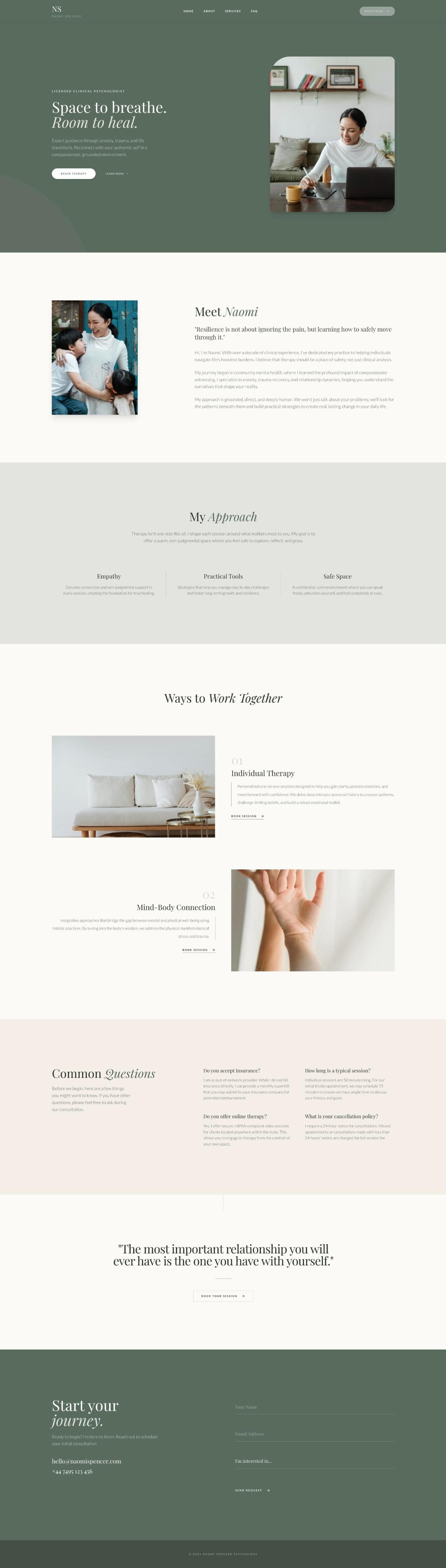
A one page website puts everything on a single scrolling page, and the best one page website examples for small practices share one thing: they read like a short conversation. They cover who you are, what you offer, how it works and how to book. For many solo practitioners, that is exactly enough. Visitors do not have to click through menus, and every section leads to the same button.
TBH Creative's guide to one page websites lists the situations where they fit best: businesses with one main service, portfolios, simple sign-ups and businesses just starting their online presence. That describes most new wellness practices. Below are one page website examples by practice, and the section order we use when we design them.
When one page is enough
A one page site works well when you have one main offer, or a few closely related ones, and you want visitors to take one action: book a call, a class or a treatment. It is also the fastest way to get online, since there is less to write and design.
It works less well when you offer many different services that each need explaining, or when you want to publish articles regularly. In those cases, a multi-page website gives each topic its own space.
The order that works
This is the section order we use when we design a one page site:
- A first screen with who you help, where and one button.
- A short introduction with your photo.
- Your services or programs, each with a starting price.
- How it works, in three or four steps.
- Testimonials or credentials, depending on your profession's rules.
- A short FAQ.
- The same button again, with your contact details and location.
Every section ends close to the button, so visitors never have to scroll far to take the next step.
A small menu at the top that jumps to each section helps too. Visitors who already know what they want, like your prices or your address, can go straight there instead of scrolling past everything else. Keep the menu labels short and plain: About, Services, Prices, FAQ, Contact.
Example: a nutritionist
First screen: "Nutrition support for women with PCOS, online across the US." Button: "Book a free 15 minute call." Then a warm photo with three sentences about your approach, two programs with starting prices, a three-step "how it works" (call, plan, follow-up), two testimonials, four questions and the button again.
The whole page can be read in two minutes on a phone, and it answers almost every question people send by message.
Example: a therapist
First screen: "Therapy for adults with anxiety, in person in Austin and online across Texas." Then your photo and a short, warm introduction, your three main specialties explained in plain words, fees and insurance, what the first session is like, and a gentle button for a free consultation call.
Instead of testimonials, which many therapists cannot use, the trust section shows your license, training and approach. Never ask for health details in the contact form.
Example: a yoga teacher or esthetician
For a yoga teacher, the first screen links straight to the weekly schedule, followed by class descriptions, an intro offer, prices and where to find you. For an esthetician, the treatments come first, each with what it does, how long it takes and where the price starts, followed by real photos of your space and a booking button.
A good one page website reads like a short, calm conversation that ends with a clear invitation.
Keep it fast
TBH Creative points out the main risk of one page sites: because everything loads at once, they can become slow if they carry heavy images and scripts. Compress your photos, avoid unnecessary effects and test the page on your phone. A fast page matters for visitors and for Google.
Growing it later
A one page site is a starting point, not a limit. As your practice grows, you can add a page for each service, a page for your story and a blog for articles. You can start with one page and grow into a multi-page website when the practice is ready.
At Delas, Website in a Day builds a one page site from one of our templates and goes live in a day, and One-Page Web Design is a single page designed from scratch around your practice. You can see one page examples in our portfolio, and we wrote about the details that build trust in what makes visitors trust a wellness website.
Questions about one page websites
Yes, for searches about your main service and your location, as long as the page is clear, fast and well written. As you add more services, separate pages help you be found for each one.
When you have several services that each deserve their own explanation, or when you want to publish articles regularly. That is usually a sign your practice has grown.
Usually, because there is less to design and write. At Delas, Website in a Day is a one page site built from a template, and One-Page Web Design is a single page designed from scratch.
One beautiful page, designed around your practice.
Website in a Day, from $497 (launch offer until Dec 31, then $697).
See the options